Product battery recycling compliance
Learn how to stay compliant with battery recycling laws while supporting a cleaner planet. This guide walks you through everything you need to set up your point-of-sale system and train your team for fee collection on two different battery recycling programs:
- California SB 1215 — Covered Battery-Embedded (CBE) Waste Recycling Fee (variable fee, % of price, capped)
- Call2Recycle — E-Bike Batteries (fixed fee collected via SKU)
❗Reminder about California SB 1215
SB 1215 isn’t a flat fee—it’s a percentage of the product’s price (with a cap), and it only applies to certain products. Your team needs to know which items qualify so they apply the fee correctly.
SB 1215 - Covered Battery-Embedded (CBE) Products
Starting January 1, 2026, California law (SB 1215) requires retailers to collect a recycling fee at checkout for certain products with built-in (non-removable) batteries. These are called Covered Battery-Embedded or CBE products.
If your store sells these items, you’ll need to collect a fee at the point of sale, display it clearly on receipts, and remit the funds quarterly to the California Department of Tax and Fee Administration (CDTFA).
⚠️ Important SB 1215 rules
Effective January 1, 2026, California law (SB 1215) requires all retailers selling products with "embedded" (non-removable) batteries to collect a new recycling fee at the point of sale.
| Requirement | Details |
|---|---|
| Fee Rate | 1.5% of the retail sales price. |
| Cap | Maximum of $15.00 per product. |
| Receipt rule | Must be a separate line item (e.g., "CA Battery Recycling Fee"). |
| Admin credit | Retailers may keep 3% of collected fees to cover admin costs. |
| Remittance | Paid quarterly to the CDTFA (First deadline: April 30, 2026). |
1) Spot covered products
- Use the manufacturer-provided list to determine which SKUs are considered CBE products (embedded / non-easily removable battery).
- Train staff to recognize covered items at the register. This is critical because the fee is not applied to entire product categories.
2) Register your store
- Register for a CBE waste recycling fee account through CDTFA Online Services.
- Confirm your filing frequency (CDTFA will assign quarterly or yearly). The first quarterly return for January 1–March 31, 2026 is due April 30, 2026.
3) Set up your fee SKU in Ascend
Because the SB 1215 fee is variable, the recommended approach is to create a single non-inventory fee SKU and override the price at checkout based on the item’s sales price.
- Navigate to Database Explorer > Products (or click the Products tile on the Ascend Desktop).
- Click Add and create a new non-inventory product:
- Description: CA CBE Recycling Fee (SB 1215)
- Brand: (leave blank or use a neutral brand like “State Fee”)
- UPC: CA-CBE-FEE
- SKU: CA-CBE-FEE
- Estimated Cost: $0.00
- MSRP: $0.00 (this will be overridden per sale)
- Tax Rate: 0.0000%
- Check the Non-Inventory box under Properties.
- Click Save.
4) Add the fee at checkout
For each covered product sold to a California customer:
- Scan the covered product as normal.
- Calculate the fee amount:
- Fee = 1.5% of the retail sales price
- Cap: $15.00 per item
- Add the CA-CBE-FEE SKU as a separate line item.
- Override the fee SKU price to the calculated fee amount.
- Ensure the fee is separately stated on the customer receipt/invoice and not included in sales tax calculation.
Optional fee payment (Paid on behalf)
If you choose to cover the fee for your customer, just make sure the receipt says something like: “The California battery-embedded recycling fee has been paid on your behalf.”
5) Submit your returns
- File your CBE waste recycling fee return electronically through CDTFA Online Services.
- Remit collected fees (less any allowed retailer retention) by the due date for your filing period.
- Maintain records showing covered products sold, fees collected, and any refunds processed.
FAQs
What qualifies as "Battery-Embedded"? Any product containing a battery that cannot be easily removed by a consumer using common household tools.
- Examples: Waterproof GPS units, sealed headlamps, smartwatches, and some portable power banks.
- Exemptions: Devices already covered by the E-Waste fee (like laptops/monitors) or items where the battery pops out without tools.
How to calculate the fee:
- Fee = 1.5% of the product’s retail price
- Max = $15 per item
- Add the fee as a separate line item using your CA-CBE-FEE SKU
- Don’t include it in the sales tax
Next steps for retailers:
-
Register: Log into the CTDFA Online Services
to add a "Covered Battery-Embedded Waste" account. - Audit Inventory: Review manufacturer notices (sent July 2025) to flag SKUs subject to the fee.
- Update POS: Ensure your system calculates 1.5% (capped at $15) and displays it clearly on receipts.
CDTFA Customer Service Center: 1-800-400-7115. Pro tip: Select the option for Special Taxes and Fees when calling.
Call2Recycle - E-Bike Batteries
E-bike batteries have a useable lifespan and at the end of that life, they need to be safely recycled. Trek partners with PeopleForBikes and Call2Recycle to make e-bike battery recycling simple and safe for you and your riders.
⚠️ Important Call2Recycle rules
- When a customer buys an e-bike or e-bike battery, you must also add the Call2Recycle SKU.
- This $15 (US) or $10 (Canada + tax) fee covers recycling.
- The SKU should show as a separate line item on the receipt.
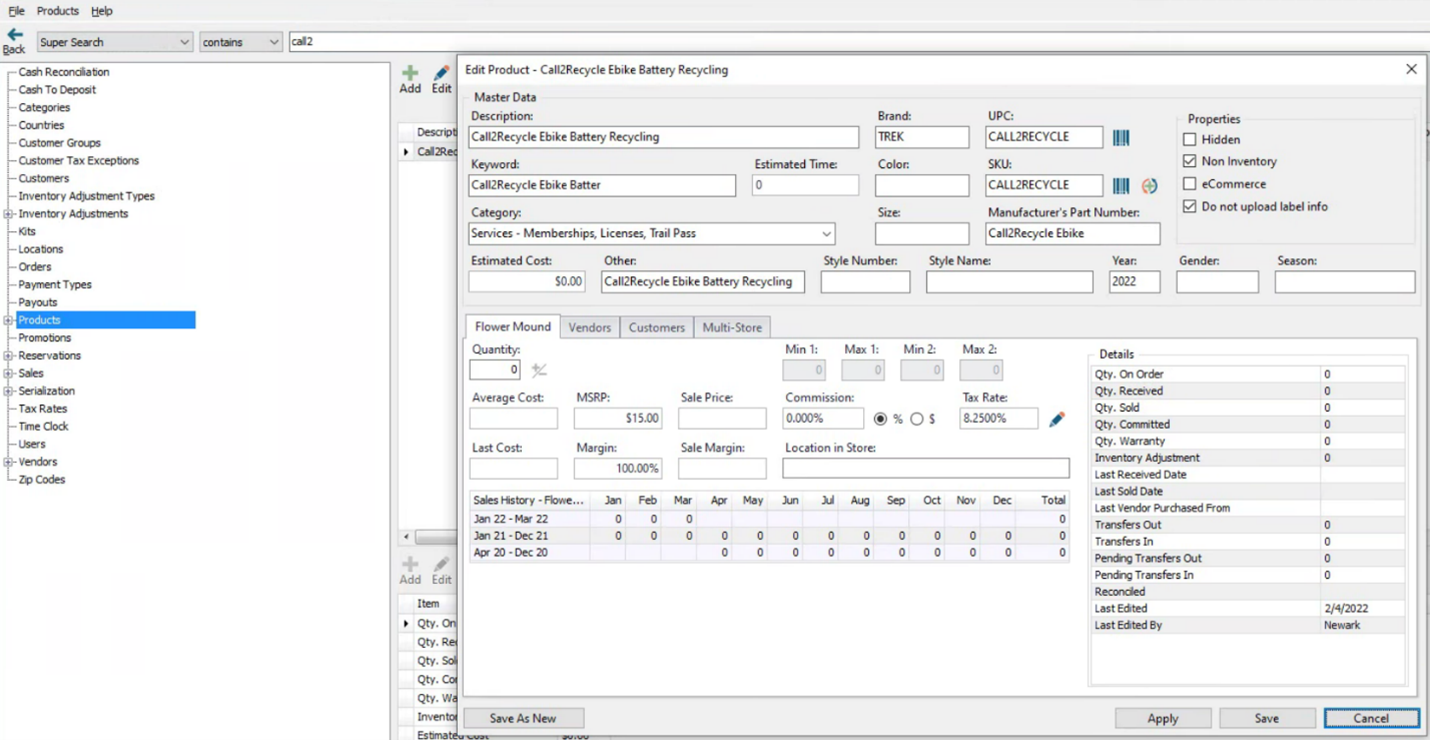
1) Create the SKU in Ascend
- Navigate to Database Explorer > Products (or click the Products tile on the Ascend Desktop).
- Click Add and create a new non-inventory product:
- Description: Call2Recycle Ebike Battery Recycling
- BRAND: Trek
- UPC: CALL2RECYCLE
- SKU: CALL2RECYCLE
- Keyword: Call2Recycle Ebike battery recycling
- Manufacturer’s Part Number: Call2Recycle Ebike
- Estimated Cost: $0.00
- MSRP: $15.00 (USA) or $10.00 (Canada)
- Check the Non-Inventory box under Properties on the top right.
- Click Save
2) Using the SKU
When checking out a customer that has purchased an e-bike or an e-bike battery at the cash register, the product should be scanned and then the Call2Recycle SKU must be added. This SKU will appear as a separate line item on the customer’s receipt.
Accounting & integrations
These are recommended steps to track recycling fees properly in your accounting system. Confirm with your bookkeeper before making changes.
Please consult your accountant before making any changes.
The accounting and TermSync guidance below is a starting point based on the existing Call2Recycle workflow. Confirm with Bookkeeping before you implement changes—especially for California SB 1215, which is a state fee that is collected and remitted (typically treated as a liability rather than revenue).
Accounting Software
- Create an income account in your accounting software for eBike Battery Recycling Fees. Include it with other income accounts mapped from Ascend.
- Create a cost of goods sold account in your accounting software for eBike Battery Recycling Fees. Do not include it with other COGS accounts mapped from Ascend. Place it near other non-Ascend COGS accounts (examples: Freight-In or Inventory Adjustments).
- Create a parent category in Ascend for eBike Battery Recycling Fees
- Categorize the SKU created above here.
- Map sales to the income account created above.
- Map cost of goods sold to the COGS account created above.
TermSync
- Once the fee begins appearing on Trek invoices, it will need to be mapped/keyed from invoices.
- US Retailers integrating TermSync with QuickBooks:
- Dashboard & Messages > QuickBooks Setup
- Assign the account number created in the Accounting steps above.
- Non-integrated retailers:
- Key the eBike Recycling fee to the cost of goods sold account created in the Accounting steps above.
✅ Why it matters
- Keeps bike and parts margins accurate
- Matches Ascend data with your income statement
- Makes fees easier to reconcile—even if a cashier forgets to charge one
KB22-132